
Remotely-managed tunnel
If you created a Cloudflare Tunnel from the dashboard, the tunnel runs as a service on your OS.
You can modify the Cloudflare Tunnel service with one or more general-purpose tunnel parameters.
On Linux, Cloudflare Tunnel installs itself as a system service using systemctl. By default, the service will be named cloudflared.service. To configure your tunnel on Linux:
-
Open
cloudflared.service.Terminal window sudo systemctl edit --full cloudflared.service -
Modify the
cloudflared tunnel runcommand with the desired configuration flag. For example,[Unit]Description=Cloudflare TunnelAfter=network.target[Service]TimeoutStartSec=0Type=notifyExecStart=/usr/local/bin/cloudflared tunnel --loglevel debug --logfile /var/log/cloudflared/cloudflared.log run --token <TOKEN VALUE>Restart=on-failureRestartSec=5s[Install]WantedBy=multi-user.target -
Restart
cloudflared.service:Terminal window sudo systemctl restart cloudflared -
To verify the new configuration, check the service status:
Terminal window sudo systemctl status cloudflared● cloudflared.service - cloudflaredLoaded: loaded (/etc/systemd/system/cloudflared.service; enabled; preset: enabled)Active: active (running) since Wed 2024-10-09 20:02:59 UTC; 2s agoMain PID: 2157 (cloudflared)Tasks: 8 (limit: 1136)Memory: 16.3MCPU: 136msCGroup: /system.slice/cloudflared.service└─2157 /usr/bin/cloudflared tunnel --loglevel debug --logfile /var/log/cloudflared/cloudflared.log run --token eyJhIjoi...
On macOS, Cloudflare Tunnel installs itself as a launch agent using launchctl. By default, the agent will be called com.cloudflare.cloudflared. To configure your tunnel on macOS:
-
Stop the
cloudflaredservice.Terminal window sudo launchctl stop com.cloudflare.cloudflared -
Unload the configuration file.
Terminal window sudo launchctl unload /Library/LaunchDaemons/com.cloudflare.cloudflared.plist -
Open
/Library/LaunchDaemons/com.cloudflare.cloudflared.plistin a text editor. -
Modify the
ProgramArgumentskey with the desired configuration flag. For example,<plist version="1.0"><dict><key>Label</key><string>com.cloudflare.cloudflared</string><key>ProgramArguments</key><array><string>/opt/homebrew/bin/cloudflared</string><string>tunnel</string><string>--logfile</string><string><PATH></string><string>--loglevel</string><string>debug</string><string>run</string><string>--token</string><string><TOKEN VALUE> </string></array> -
Load the updated configuration file.
Terminal window sudo launchctl load /Library/LaunchDaemons/com.cloudflare.cloudflared.plist -
Start the
cloudflaredservice.Terminal window sudo launchctl start com.cloudflare.cloudflared
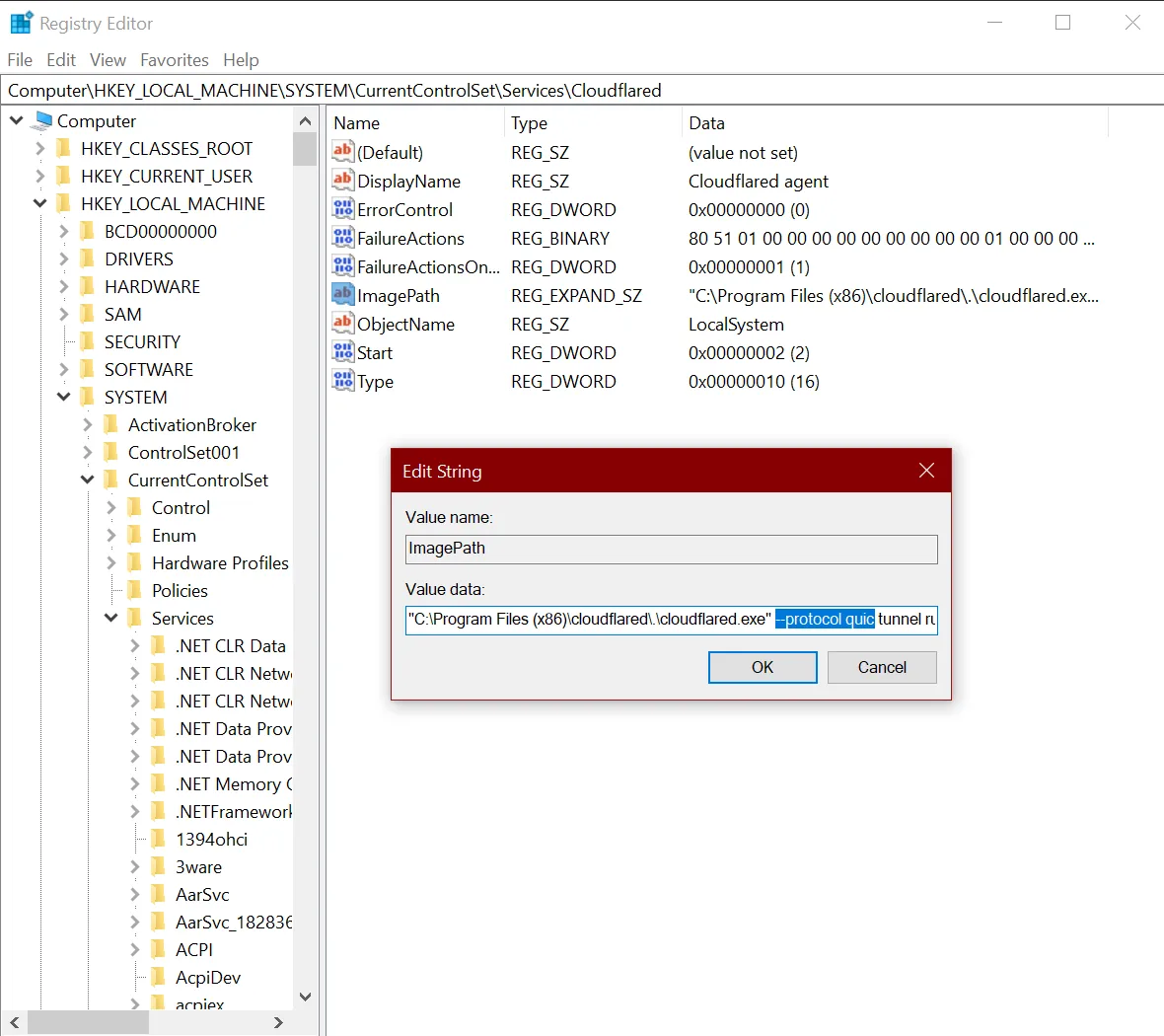
On Windows, Cloudflare Tunnel installs itself as a system service using the Registry Editor. By default, the service will be named cloudflared. To configure your tunnel on Windows:
-
Open the Registry Editor.
-
Go to HKEY_LOCAL_MACHINE > SYSTEM > CurrentControlSet > Services > cloudflared.
-
Double-click ImagePath.
-
Modify Value data with the desired configuration flag. For example,
C:\Program Files (x86)\cloudflared\.\cloudflared.exe tunnel --loglevel debug --logfile <PATH> run --token <TOKEN VALUE>
To configure how cloudflared sends requests to your public hostname services:
- In Zero Trust ↗, go to Networks > Tunnels.
- Choose a tunnel and select Configure.
- Select the Public Hostname tab.
- Choose a route and select Edit.
- Under Additional application settings, modify one or more origin configuration parameters.
- Select Save hostname.
A remotely-managed tunnel only requires the tunnel token to run. Anyone with access to the token will be able to run the tunnel. You can get a tunnel’s token from the dashboard or via the API.
Account members with Cloudflare Access and DNS permissions will be able to create, delete, and configure all tunnels for the account.